---
title: System Overview
description: Better understand Vis|Ability
---
[Skip to content](https://knowledge.vis-ability.com/en/vis-ability.co-knowledge/system-components#main-content)
[](https://www.vis-ability.com)
Open main navigation
Close main navigation
- [Contact us](https://www.vis-ability.com/contact-us)
[Contact us](https://www.vis-ability.com/contact-us)
How can we help you?
- There are no suggestions because the search field is empty.
1. [Vis|Ability Knowledge Base](https://knowledge.vis-ability.com/en/vis-ability.co-knowledge?hsLang=en)
2. [Introduction](https://knowledge.vis-ability.com/en/vis-ability.co-knowledge/introduction?hsLang=en)
3. [What is vis|ability?](https://knowledge.vis-ability.com/en/vis-ability.co-knowledge/introduction?hsLang=en#what-is-visability)
November 24, 2025
# System Overview
## Take a Tour of the vis|ability software
**What is vis|ability?**
**Vis|ability** – in it’s most basic form – is a network-distributed platform that that is both a simple yet intuitive management and collaboration system for any complex mix of content that may be found in a modern-day control room or mission-critical environment.
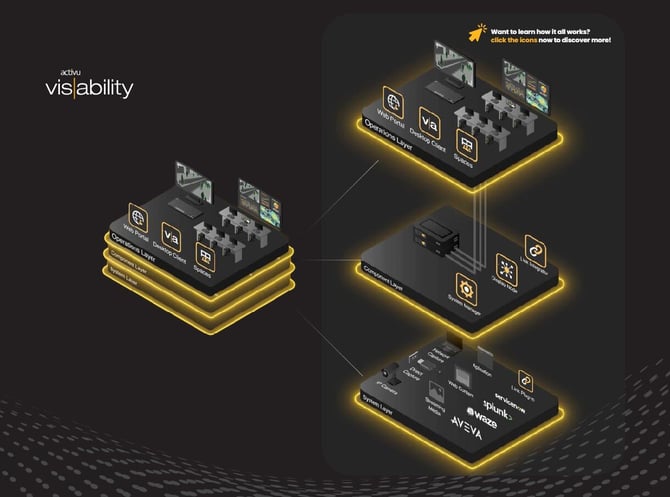
The solution itself offers a variety of different things – whether it be control of the entire spectrum of shared visual displays. To fluid communication and collaboration within (and in some cases outside) an organization and between colleagues, all using live content. View, manage, collaborate, and control visual information across video walls, desktops, & mobile devices through an elegant, efficient, and friendly workspace. See the typical system layout below (or [click here](https://heyzine.com/flip-book/f9f3cec9df.html#page/2)):
**Take a Tour of the vis|ability Components**
[](https://resources.vis-ability.com/8dcbbd128b.html)
**The Basics**
A typical vis|ability deployment is comprised of three major components:
**System Manager**, **Display Node**, and the **End User Software**
**System Manager** – is the central repository of configuration information concerning a **vis|ability** deployment. Typically referred to as "The Brains of the Operation", this database hosts the definitions of users and their permissions, associated **Sources**, **Displays**, and other component definitions, as well as licensing information. The **System Manager** (and other associated components) are typically installed on a server-class computer or virtual machine. It can also be hosted in the **[Cloud](https://knowledge.vis-ability.com/en/vis-ability.co-knowledge/vis-ability-cloud?hsLang=en)**. See a breakdown of its components below:
**Display Node** – is an end point destination or connected device coming from the **System Manager**. These are Windows-based machines with specialized **vis|ability** software componentry installed that will allow users to push, drive, and manage content on its associated **Video Wall**.
**End User Software** – is comprised of two applications: ***vis|ability Desktop Client*** and ***vis|ability Administration Client***. **Desktop Client** is the application that allows users to manage and control the content being visualized on a **Video Wall**. **Administration Client** is the application that allows the creation and adding of sources.
- [Home](https://knowledge.vis-ability.com/en/vis-ability.co-knowledge)
- [Product Commissioning](https://knowledge.vis-ability.com/productcommissioning)
- [Training](https://knowledge.vis-ability.com/product-training)
- [Partners](https://knowledge.vis-ability.com/en/partner-portal)
- [Customer Portal](https://knowledge.vis-ability.com/tickets-view?status=all&view=my_tickets&offset=0)
[](https://www.vis-ability.com)
[mailto:info@vis-ability.com](mailto:info@vis-ability.com)
Copyright © 2025