
What is Link?
Download Datasheet Here: Link
vis|ability, with Link, enables organizations to gain valuable and timely insight into the current state of operations by providing automated visualization of important information associated with incidents and events within the organization, targeted to those who need to know. For more information, please click Here.
How does it work?
Example Workflow
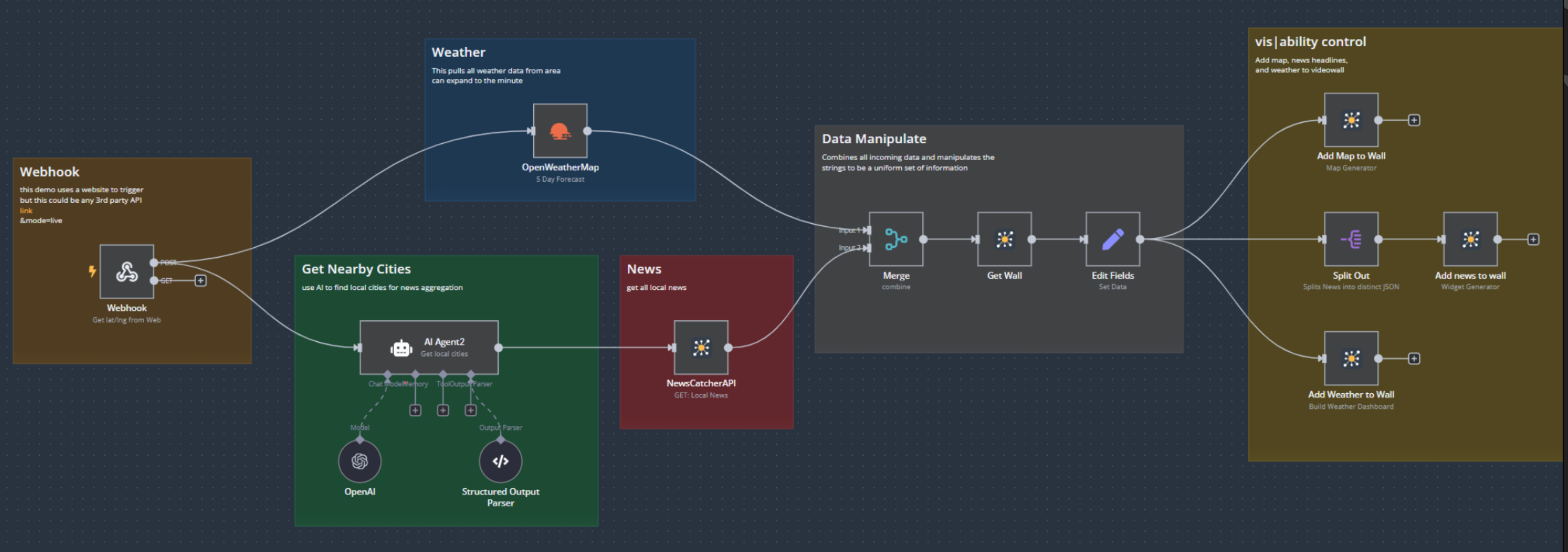
The diagram above illustrates a typical Link workflow and demonstrates how information flows from external systems into vis|ability.
Event Detection
Everything begins with a system of record. This could be a SCADA system, CAD application, network monitoring platform, video management system, physical security system, building management system, IT service desk, or virtually any application capable of generating an event.
When something important occurs, the external system notifies Link through a supported integration method such as:
- Webhooks
- REST APIs
- Message queues
- Database events
- Vendor-specific integrations
- Other event-driven communication methods
Instead of relying on an operator to notice the event, the notification is delivered automatically the moment conditions change.
Data Enrichment
Once Link receives the event, it can enrich the incoming information by gathering additional context from other internal systems, third-party services, or AI-driven processes.
Examples of enrichment include:
- Looking up asset information
- Identifying affected locations
- Correlating multiple related events
- Determining severity or priority
- Adding GIS coordinates
- Retrieving associated camera feeds
- Classifying incidents using AI or business logic
This enrichment transforms a simple alert into meaningful operational context.
Data Normalization
Because every external system communicates differently, Link normalizes incoming information into a consistent format that vis|ability understands. This normalization process allows organizations to integrate multiple independent systems without requiring each one to communicate in the same language. Regardless of whether the event originated from a SCADA alarm, cybersecurity platform, email notification, or REST API, vis|ability receives standardized, actionable data.
Automated Actions
Once the event has been normalized, it is delivered to vis|ability, where administrator-defined automation rules determine how the platform should respond.
Depending on the workflow, Link can automatically:
- Load or update Display Wall layouts.
- Add, remove, or replace Sources on Displays.
- Populate user Spaces with relevant information.
- Display live camera feeds.
- Open dashboards or GIS maps.
- Launch web pages or applications.
- Route operational information to mobile users.
- Notify operators or specific user groups.
- Trigger additional automated workflows.
All of these actions occur automatically, allowing operators to focus on decision-making instead of manually assembling information.