
Overview
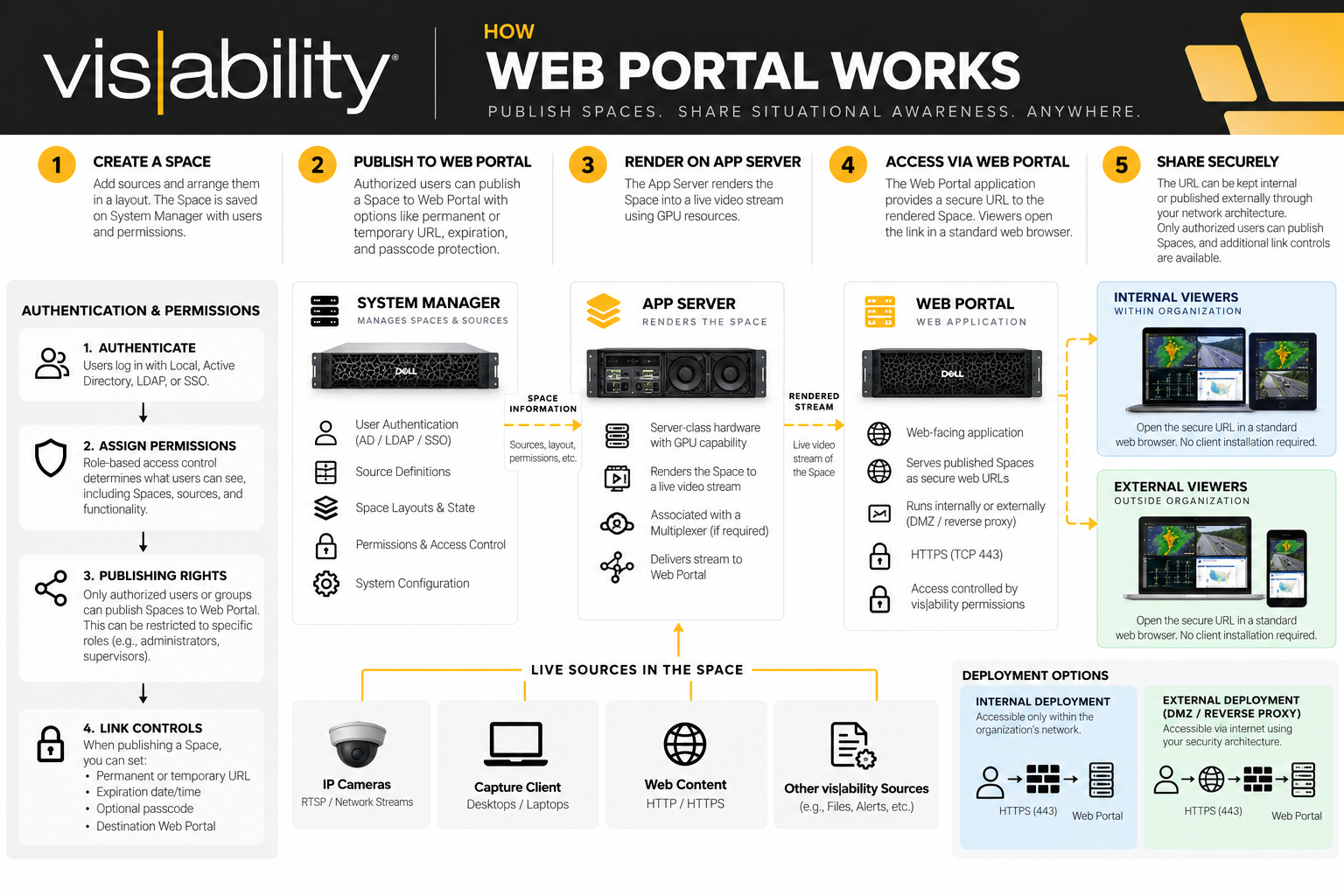
The easiest way to understand Web Portal is to start with Spaces.
With a normal Space, vis|ability is essentially telling the client: Here are the sources that belong in this workspace, and here is how they are arranged. When a user opens that Space in Desktop Client, those sources are opened and rendered locally on that user's machine.
Web Portal changes that delivery model.
Instead of requiring each person viewing the Space to open and render those sources locally, Web Portal allows the finished Space to be rendered as a live video stream and made available through a dedicated web URL.
A viewer can open that URL in a standard web browser and see the live Space without installing Desktop Client. More importantly from an IT perspective, the viewer does not need direct network access to every camera, Capture Client, or other underlying source contained within the Space. This makes Web Portal useful for extending situational awareness to users who need to see operational information without needing full access to the vis|ability environment.
How it Works
There are really two pieces behind Web Portal: the Web Portal application and the App Server.
Web Portal itself is an application. It is the web-facing portion of the solution, so there is flexibility in where that application lives depending on how IT wants to architect the environment.
The App Server is different. This requires actual compute resources, including GPU capability, because the App Server is doing the rendering work. Think of it similarly to the server-class hardware used for System Manager—something like an R360-class server—but with the GPU resources necessary for the rendering workload.
When we publish a Space, the App Server takes that Space and renders the finished view. Web Portal then makes that rendered content available as a live stream through a web URL.
This is an important distinction from opening a normal Space in Desktop Client. With Desktop Client, the individual sources within the Space are being opened and rendered at the user's workstation. With Web Portal, the App Server is doing that rendering work on the vis|ability side and Web Portal is providing the resulting view to the browser.
Because of that, we're not giving the browser direct access to all of the individual sources contained within the Space. The browser is receiving the published view through Web Portal.
A simple way to remember the relationship is:
The App Server renders the Space. Web Portal publishes it. The browser displays it.
Where does this live?
From an IT perspective, another important consideration is where that web access lives.
Web Portal can be completely internal, where the published URL is only accessible from within the organization's network. Or, if there is a requirement to share that information outside the organization, Web Portal can be incorporated into an external-facing architecture using a DMZ, reverse proxy, firewall, HTTPS over 443, and whatever other security standards the organization requires.
The important distinction is that we're not asking IT to expose the camera network, operational network, or individual sources to the internet. We're publishing the resulting view of that information through Web Portal.
There are also controls around how that information is shared. A Web Portal link can be permanent or temporary, can be configured to expire, can require a passcode, and—through vis|ability permissions—we can control who is allowed to publish content in the first place.
Authentication, Permissions, and Security
From an authentication and permissions standpoint, Web Portal does not mean every vis|ability user can start publishing information to the web.
The ability to generate and publish a Web Portal link can be controlled through vis|ability user and group permissions.
For example, an organization may have 100 users who can access Spaces internally, while only a specific group of supervisors or administrators has permission to publish those Spaces through Web Portal.
This can tie into the same authentication structure already being used within the vis|ability environment. If Active Directory or SSO is being used, authentication establishes who the user is, while vis|ability permissions determine what that user is authorized to do—including whether that user has the ability to create Web Portal links.
Being able to access a Space does not automatically mean a user has permission to publish that Space.
Once a Space is published, there is another layer of control around the link itself. Depending on the sharing requirements, that can include a temporary or persistent URL, expiration, and passcode protection.
There are therefore several layers of security involved:
- Who can access the content
- Who has permission to publish it
- How the published link is protected
- Where the Web Portal is reachable from
That last layer remains an IT/network decision. Web Portal can remain accessible only from the internal network, or it can be intentionally made available externally through the organization's approved network and security architecture.