
Overview
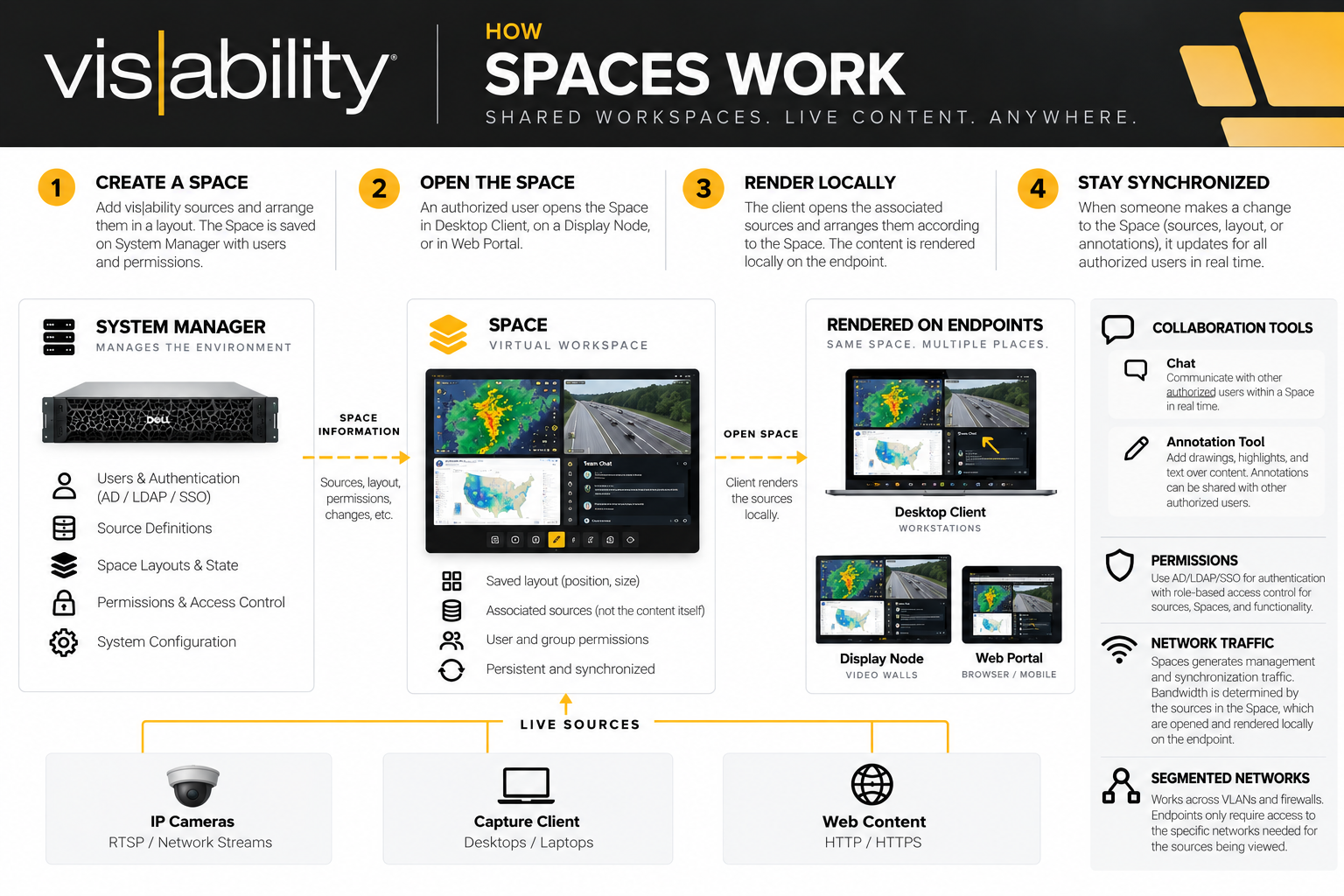
A vis|ability Space is a server-managed, shared workspace that allows users to organize multiple sources into a persistent layout.
Unlike a Desktop Area, which is associated with a physical display or video wall, a Space exists logically within the vis|ability environment. This allows the same workspace to be accessed by authorized users from different locations and endpoints.
The System Manager maintains the Space, including:
- The sources included in the Space
- The position and size of those sources
- The current state of the workspace
- User and group permissions
- Changes made by authorized users
When an authorized user opens a Space, Desktop Client opens and renders the sources associated with that Space locally and arranges them according to the saved workspace.
Multiple authorized users can access the same Space. Changes made within the Space can then be synchronized between those users.
A Simple Way to Think About It
From an IT perspective, a Space is less like traditional screen sharing and more like a shared application workspace.
The Space essentially tells the client:
“Open these sources and arrange them this way.”
The platform manages the workspace, synchronization, and permissions. The endpoint renders the content and must have access to the services necessary to display the sources within that Space.
This distinction is important when considering network traffic, bandwidth, VLANs, and firewall requirements.
From an IT perspective, a Space is less like traditional screen sharing and more like a shared application workspace.
Common Questions from IT Staff
What network traffic does Spaces generate?
There are two general categories of traffic associated with a Space: management traffic and content traffic.
Management and synchronization traffic maintains the state of the Space. This includes information such as which sources are open, their position and size, permissions, and changes to the workspace.
Content traffic is the actual content being displayed: camera streams, Capture Client desktops, web content, and other supported sources.
A Space should therefore not be thought of as a single composite video stream being generated by System Manager and sent to every user.
Instead:
Spaces manages the workspace and coordinates its state. The underlying source type determines how the actual content reaches the endpoint.
If a user opens a Space containing several live sources, the network requirements will generally reflect the requirements of those individual sources.
Does the endpoint need network access to each source?
It depends on the source type and how that source is delivered within the vis|ability architecture.
Because Desktop Client renders the contents of a Space locally, the endpoint must be able to communicate with the services necessary to render those sources.
For example, a directly accessed network source may require the rendering endpoint to have a valid network path to that source.
Other source types may use vis|ability infrastructure as part of the delivery path. Capture Client, for example, can use the Multiplexer for distribution rather than requiring every viewing workstation to establish an independent connection directly to the originating desktop.
A useful rule for IT is:
The vis|ability component responsible for rendering or distributing a source must have network connectivity to the components required to deliver that source.
This does not mean every vis|ability workstation needs unrestricted access to every source network.
If IP cameras reside on a dedicated Camera VLAN, for example, routing and firewall policies can be designed around the specific systems that require access rather than broadly opening the Camera VLAN to the corporate user network.
How do authentication and permissions work?
Authentication and authorization serve two different purposes within vis|ability:
Authentication determines who the user is. Permissions determine what that user is allowed to access and do.
vis|ability can integrate with an organization's existing authentication environment, including Active Directory/LDAP and supported SSO configurations.
Once authenticated, vis|ability permissions can control access to system resources, functionality, and Spaces.
Therefore, membership in a Space does not inherently grant a user unrestricted access to the rest of the vis|ability environment.
Spaces operate within the user's existing vis|ability permissions rather than bypassing them.
This allows organizations to use a shared vis|ability system while maintaining separation between departments, operational groups, or other security boundaries.
How do Spaces work across VLANs and Firewalls?
As was mentioned above, when an authorized user opens that Space, Desktop Client opens and renders those sources locally and arranges them according to the Space.
Because of that, the primary network consideration is the content being opened. A Space containing several live sources has similar network requirements to opening those same sources individually in Desktop Client. The exact traffic path depends on the source type and whether that content is accessed directly or delivered through vis|ability infrastructure such as the Multiplexer.
From a security standpoint, normal network segmentation still applies. Users only see resources permitted through vis|ability, while VLANs, routing, and firewall policies determine which endpoints and vis|ability components can communicate with the underlying source networks.
This allows the network architecture and the application security model to work together.
vis|ability determines whether the user is authorized to access the resource. The network determines whether the necessary systems can communicate to deliver that resource.