
Overview
Many customers use vis|ability alongside collaboration platforms like Microsoft Teams and Zoom. Integrating these is a well‑established requirement that we’ve successfully fulfilled for a wide range of environments and use cases.
What the Integration Typically Enables
Common goals for vis|ability integrations with Teams or Zoom include:
-
Visualizing collaboration sessions in vis|ability
Displaying relevant Teams or Zoom content—such as shared screens, meeting feeds, or dashboards—within vis|ability for situational awareness. -
Bringing vis|ability content into collaboration spaces
Sharing vis|ability video walls, layouts, or sources into a Teams or Zoom meeting, so remote participants see the same operational picture as those on‑site. -
Coordinated workflows across platforms
Aligning how events in Teams or Zoom (for example, starting a critical incident bridge) relate to what’s displayed and managed in vis|ability.
Common Integration Patterns
Because this use case comes up frequently, we rely on several proven patterns for connecting vis|ability with Teams and Zoom, such as:
-
Screen or window sharing from vis|ability displays
Operators share a specific vis|ability layout or source into a Teams/Zoom meeting, giving remote users a live view of operations. -
Dedicated collaboration “bridge” workstations
A dedicated system joins Teams or Zoom meetings and is managed as a source within vis|ability, allowing collaboration sessions to be placed into layouts and distributed across walls. -
Use of virtual devices or encoders
Teams/Zoom content is captured via virtual or physical encoders and ingested into vis|ability when more control over placement and display is required.
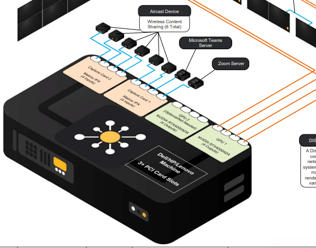
If the room has an existing control system—such as Q‑Sys, Crestron, or similar—our engineers can incorporate this as part of the overall design so that vis|ability, Teams/Zoom, and room controls work together as a unified solution.
The right approach depends on your security requirements, network design, room control systems, and the Teams/Zoom features and licensing in your organization.
Engineering Support for your Specific Use Case
Integrating vis|ability with Microsoft Teams or Zoom is a common, well‑understood requirement that we have implemented many times across different customers and environments. If you have specific technical questions—such as network/security considerations, hardware or encoding options, room control integration, or how to scale the integration—our engineering team can assist.
To discuss your specific environment and goals, please contact us at:
https://www.vis-ability.com/contact-us