
The vis|ability Deployment - An Overview
Click the Image Below for a Deep-Dive
A vis|ability deployment integrates software, hardware, and network components to deliver real-time situational awareness and visual collaboration across a control room or distributed operations environment.
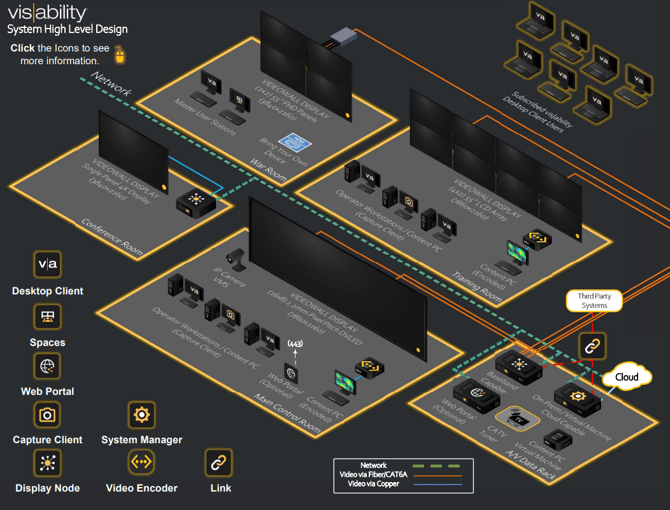
The Major Components
The deployment is tailored to the customer’s operational needs but generally includes the following components:
-
System Manager: Centralized server (physical or virtual) hosting the vis|ability platform’s core services and system database.
-
Administration Client: Used by system administrators to configure users, sources, groups, and permissions.
-
Desktop Clients: Installed on operator workstations to allow users to create and control content layouts, interact with live sources, and collaborate across displays or remote users.
-
Display Nodes: Small-form-factor PCs or GPUs that drive video walls or large-format displays by rendering the source content.
-
Sources: A wide range of visual content inputs, such as desktops, web pages, camera streams, dashboards, or file-based media, captured via software (e.g., Capture Client) or defined directly.
-
Audio and Automation: Optional components like audio zones, scripted actions, SOPs, or Link integrations for automated workflows and interoperability.
-
Networking: Deployed on a secure LAN or VLAN environment with optional VPN or cloud extensions for distributed access and redundancy.
Deployments can be on-premises, hybrid, or cloud-based depending on organizational requirements, with flexible scalability to support single-room installations or multi-site enterprise environments.