
Overview
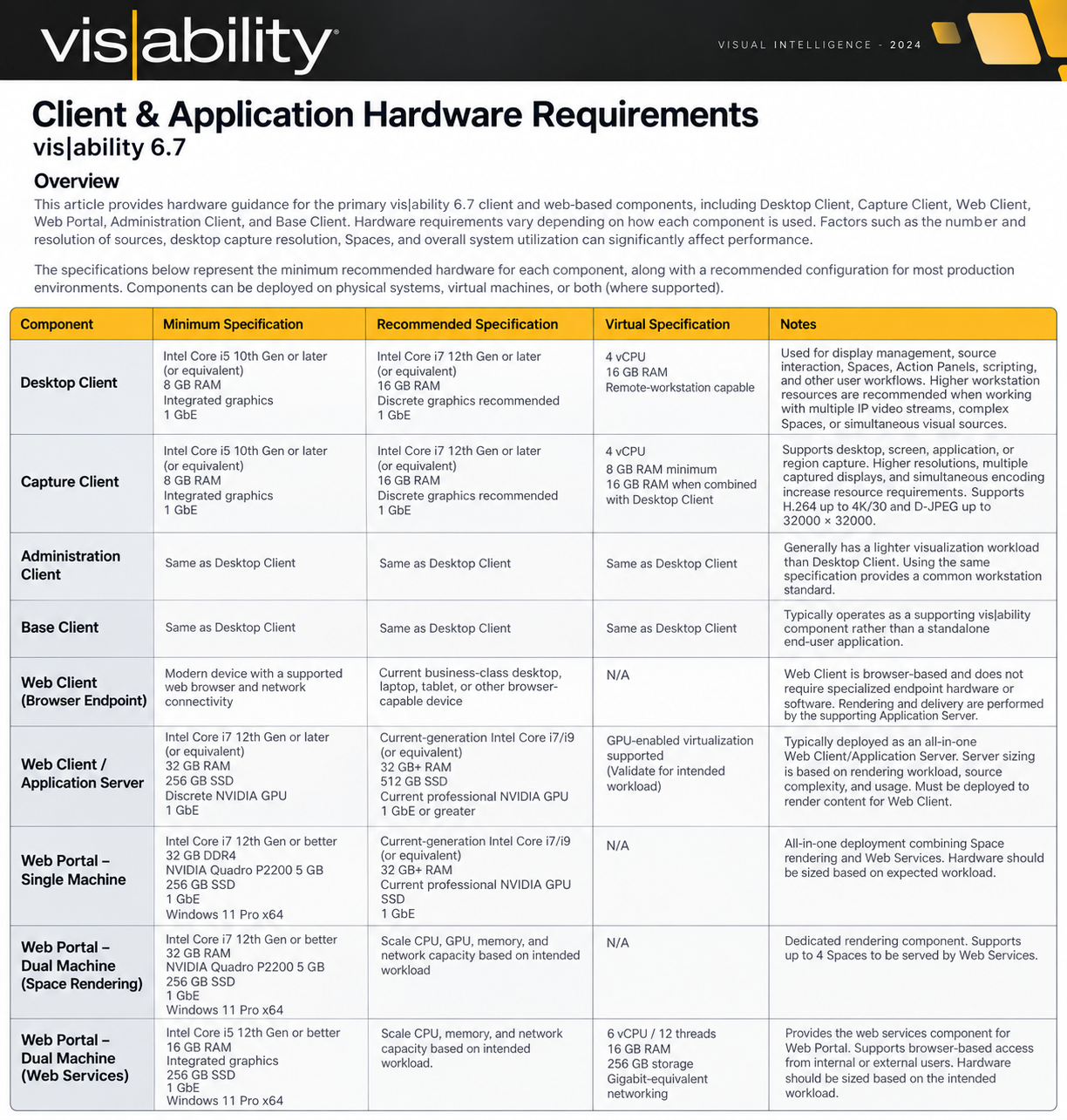
This article provides hardware guidance for the primary vis|ability 6.7 client and web-based components, including Desktop Client, Capture Client, Web Client, Web Portal, Administration Client, and Base Client.
Hardware requirements vary depending on how each component is used. Factors such as the number and resolution of sources, simultaneous IP video streams, desktop capture resolution, Spaces, source complexity, network bandwidth, and overall system utilization can significantly affect performance.
Minimum Specification represents the minimum recommended hardware baseline for normal operation. Minimum configurations are appropriate for standard workloads but may experience reduced performance as the number, resolution, or complexity of simultaneous sources increases.
Recommended Specification represents the preferred hardware configuration for typical production environments and provides additional capacity for higher utilization and more demanding visualization workloads.
Virtual Specification provides a recommended resource baseline when a component is deployed within a virtual environment. Components may be deployed physically, virtually, or in combination depending on the component and use case. Components requiring graphics acceleration may require additional consideration when virtualized.
Important: Hardware specifications provide a sizing baseline and do not guarantee performance under every operational load. High-demand or specialized deployments may require additional resources.
Desktop Client
The vis|ability Desktop Client is the primary workstation interface for interacting with and controlling the vis|ability environment.
Desktop Client enables users to organize and publish visual information to Display Nodes, share content with other users, and capture application windows or screens as Sources. It also provides access to advanced functionality such as scripting, Action Panels, Link, and Web Portal. visability-DesktopClient
Hardware Considerations
For normal display management, Action Panels, and general system interaction, a modern business-class workstation is generally sufficient.
Additional workstation resources should be considered when the workstation will regularly be used to view multiple IP video sources, interact with complex Spaces, display several high-resolution sources simultaneously, or perform several visualization tasks at once.
For these use cases, the Recommended Specification should be considered the preferred baseline.
Virtual Deployment
Desktop Client can also be deployed within an appropriately provisioned virtual workstation environment.
A baseline of 4 vCPU and 16 GB RAM is recommended. The virtual desktop should be configured as a remote-workstation environment appropriate for the visual workload being presented to the user.
Where GPU acceleration is required by the workload, appropriate virtual graphics resources should also be considered.
Capture Client
The vis|ability Capture Client is an encoding component that enables vis|ability to acquire content from a network-connected computer and make that content available throughout the platform.
Capture Client can acquire an entire desktop, one or multiple screens, an individual application, or a predefined region of the desktop. visability-CaptureClient
The current Capture Client supports configurable encoding including H.264 up to Level 5.1 at 4K/30, D-JPEG up to 32000 × 32000 resolution at 32 bpp, and VNC. visability-CaptureClient
Hardware Considerations
Capture Client requirements depend heavily on the content being captured.
Capturing a single application or standard-resolution desktop places substantially less demand on the workstation than capturing multiple high-resolution displays or high-motion content.
Additional resources should be considered when:
-
-
- Capturing multiple displays
- Capturing high-resolution desktops
- Encoding high-motion content
- Running Capture Client alongside Desktop Client
- Running other resource-intensive applications on the same workstation
-
Where Desktop Client and Capture Client are installed together, the Desktop Client recommended specification should be used as the baseline, with additional resources provided where the capture workload warrants it.
Virtual Deployment
Capture Client can be deployed within a VM when the environment provides access to the desktop or applications that need to be captured.
A baseline of 4 vCPU and 8 GB RAM is recommended for Capture Client alone. Where Desktop Client and Capture Client are running within the same virtual workstation, 16 GB RAM should be used as the starting point.
Web Client
The vis|ability Web Client provides browser-based access to the vis|ability platform.
The user-facing endpoint can be a desktop, laptop, tablet, or other appropriate device with a supported modern web browser and network connectivity. Web Client is designed to provide device-agnostic browser access without requiring specialized vis|ability client hardware or locally installed client software. visability-WebClient
However, the browser endpoint is only one part of the Web Client architecture.
Web Client Application Server
A supporting Application Server performs the processing and rendering required to present vis|ability content through the Web Client.
This distinction is important when designing the system. The device running the browser may require relatively few resources because the supporting server performs the primary rendering workload.
In a typical deployment, the Web Client services and Application Server are deployed together on an all-in-one machine.
Recommended Application Server Baseline
Minimum
-
- Intel Core i7 12th Generation or later/equivalent
- 32 GB RAM
- 256 GB SSD
- Discrete NVIDIA GPU
- 1 Gigabit Ethernet
Recommended
-
- Current-generation Intel Core i7/i9 or equivalent
- 32 GB RAM or greater
- 512 GB SSD
- Current professional NVIDIA GPU
- 1 Gigabit Ethernet or greater
Web Portal
The vis|ability Web Portal allows Spaces to be published and distributed to users and devices through a standard web browser.
Web Portal supports controlled publication of selected Spaces, including publication to users outside the normal vis|ability environment. It supports access controls, configurable publication periods, and password protection. visability-WebPortal
Web Portal can be deployed using either a single-machine or dual-machine architecture.
Single-Machine Web Portal
A single-machine deployment combines Space Rendering and Web Services on one workstation.
Minimum Specification
-
- Processor: Intel Core i7 12th Generation or better
- Memory: 32 GB DDR4 or better
- Graphics: NVIDIA Quadro P2200, 5 GB
- Storage: 256 GB SSD
- Network: Minimum 1 Gigabit Ethernet
- Operating System: Windows 11 Pro x64
These specifications come directly from the current Web Portal hardware guidance. visability-WebPortal
For new deployments, a current professional NVIDIA GPU meeting or exceeding the requirements of the specified P2200 should be preferred where practical.
Dual-Machine Web Portal
For environments where the rendering and web-serving functions should be separated, Web Portal can be deployed across two systems.
Space Rendering
The Space Rendering machine performs the graphical rendering of the Spaces being distributed through Web Portal.
Minimum Specification
-
- Intel Core i7 12th Generation or better
- 32 GB DDR4 or better
- NVIDIA Quadro P2200 5 GB or better
- 256 GB SSD
- Minimum 1 Gigabit Ethernet
- Windows 11 Pro x64
The current configuration supports rendering up to four Spaces to be served by the Web Services component.
Web Services
The Web Services machine provides the web-facing services required to deliver the rendered content.
Physical Workstation
-
- Intel Core i5 12th Generation or better
- 16 GB DDR4 or better
- Integrated graphics
- 256 GB SSD
- Minimum 1 Gigabit Ethernet
- Windows 11 Pro x64
Virtual Machine
-
- 6 vCPU / 12 threads
- 16 GB RAM
- 256 GB storage
- Gigabit-equivalent virtual networking
The current Web Portal architecture also supports multiple Web Portals configured for load-balanced operation where required.